
4 WAYS: How to Add Videos to a Squarespace Website
Videos can make a website feel more engaging, professional, and easier to understand.
Whether you're building an online course, a membership area, a portfolio, a coaching website, or simply want to showcase your work, adding video can help visitors connect with your content faster than text alone.
Many Squarespace users also upload videos to YouTube as Unlisted and then embed them on their website. This is especially useful for client portals, training materials, private tutorials, and course content.
The good news?
Adding videos to Squarespace is surprisingly simple.
In this guide, I'll show you 4 practical ways to add video to Squarespace, explain when to use each method, and share a few limitations you should know before getting started.

Need Help with Your Squarespace Website?
Book a free kick-off call to discuss your project requirements in detail. Whether you're launching a new Squarespace website, redesigning an existing one, or looking to improve functionality and user experience, we'll help you explore the best options for your goals.
1. Add Video to Squarespace Using an Embed Code
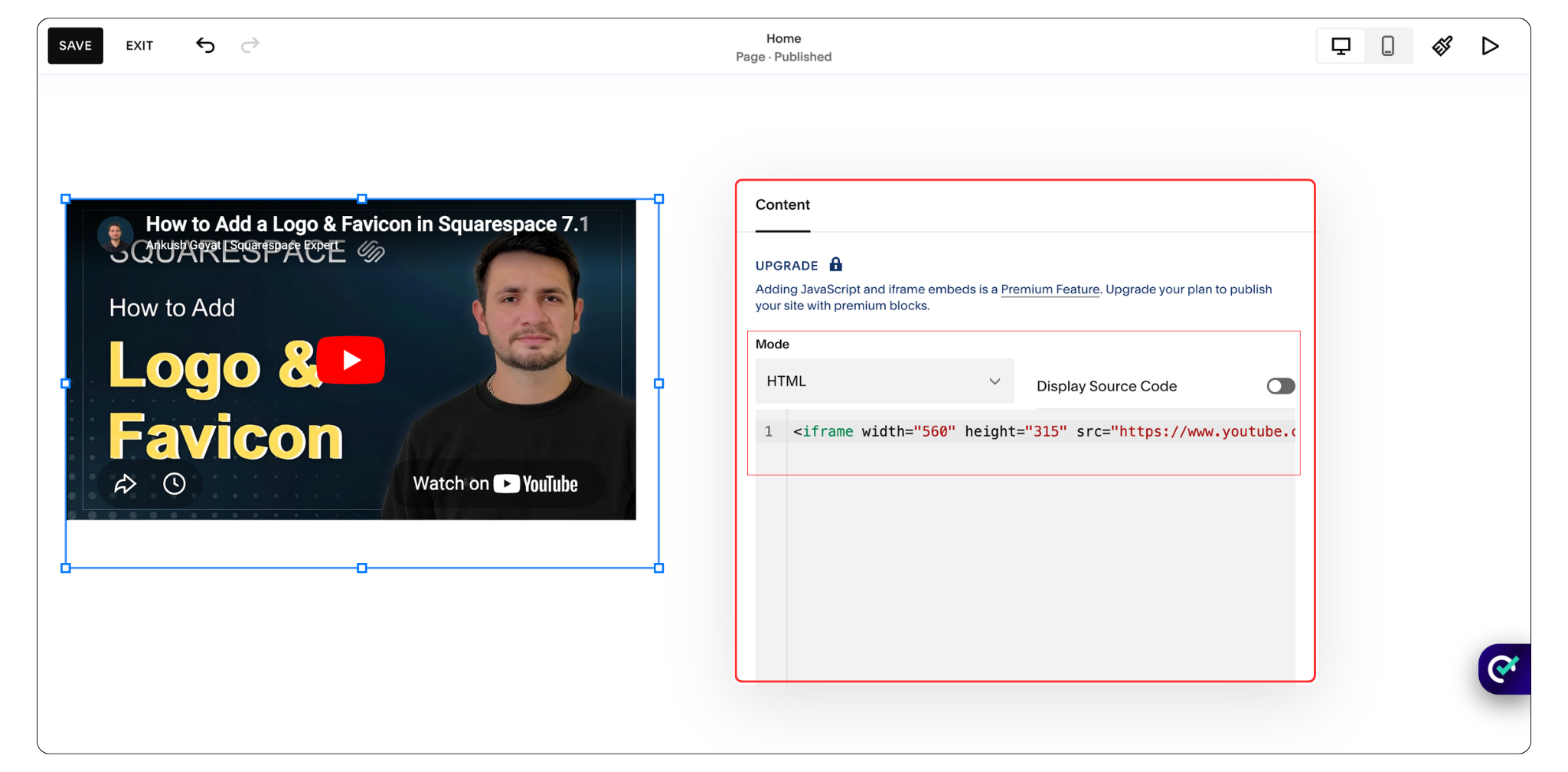
If someone asks me how to add video to Squarespace website, this is usually the first method I recommend. Instead of uploading the video directly to Squarespace, you host it on YouTube or Vimeo and then embed it onto your page.
How to Add a Video Using an Embed Block
Upload your video to YouTube or Vimeo.
Copy the Embed Code or video URL.
Open the page you want to edit.
Add an Embed Block.
Paste the code or URL.
Save and publish.
Now, the video appears directly on your website page with a built-in video player. Visitors can watch the video without leaving your website. If you're using YouTube, they'll see the YouTube player. If you're using Vimeo, they'll see the Vimeo player.
Why This Method Is My Favorite
This is the most flexible way to add video to Squarespace because:
There is no 30-minute upload limit.
You can embed very large videos.
Website performance remains strong.
YouTube and Vimeo handle video streaming.
It's ideal for memberships, courses, webinars and tutorials.
In my experience, this is the best solution if you're looking for how to add video on Squarespace without worrying about file limitations.
2. Add Video Using the Squarespace Video Block
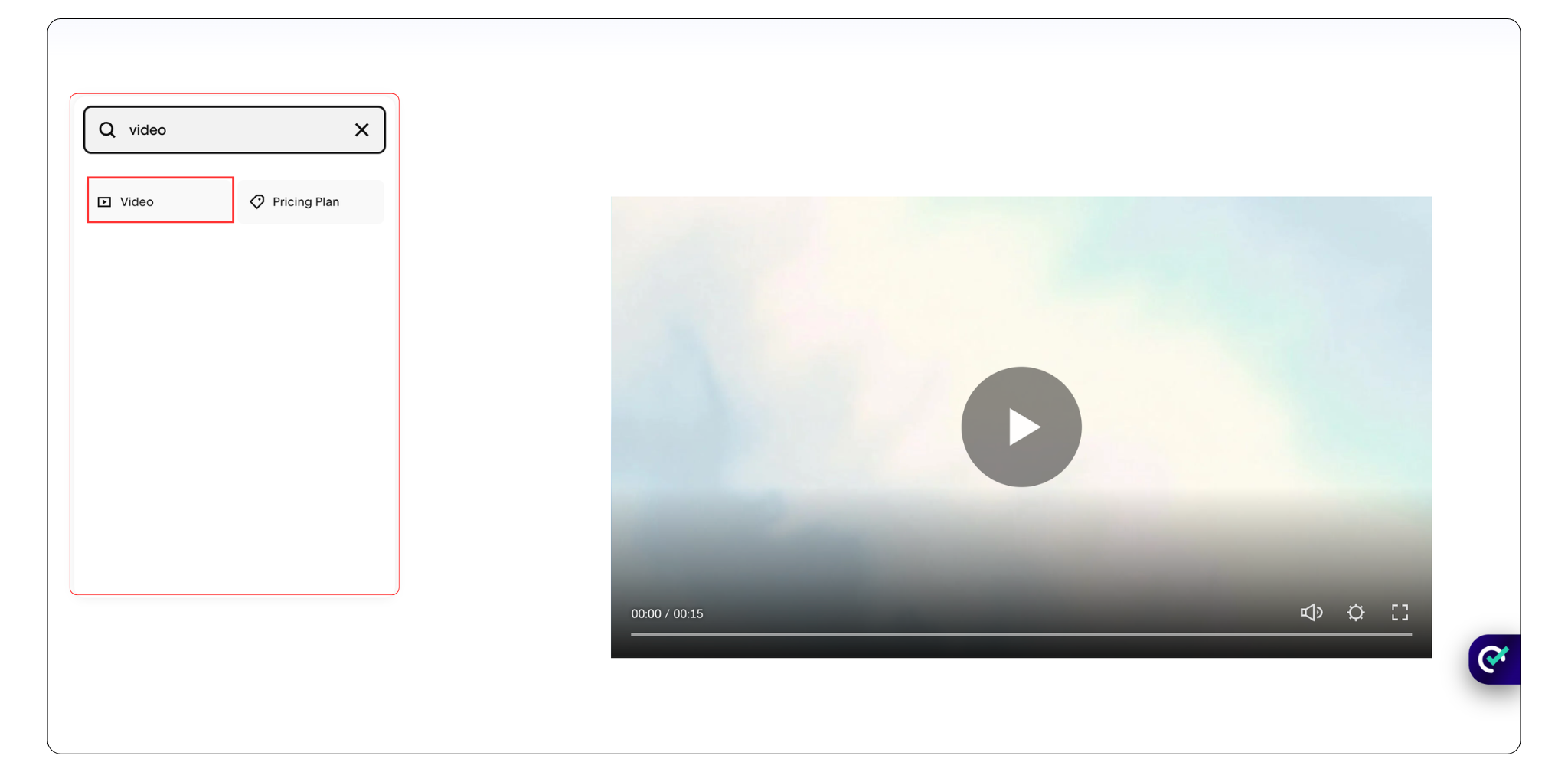
The Video Block is the easiest option for beginners. Squarespace allows you to upload a video directly to your website or connect a YouTube or Vimeo video.
Steps
Open the page you want to edit.
Click Add Block.
Select Video Block.
Upload your video .
Save your changes.
Important Limitation
This is the biggest drawback of the Video Block. Squarespace only allows videos up to 30 minutes long. Even if your video exceeds the limit by a few seconds, the upload will fail. If you're planning to add lengthy training videos, webinars, or tutorials, using the Embed method is usually the better option. It works best for homepage videos, testimonials, product demonstrations and portfolio videos. You can also pair your videos with supporting images to create a more engaging layout.
3. Add a Background Video in Squarespace
Want your website to feel more modern and dynamic? A background video can instantly add movement and visual interest to a page.
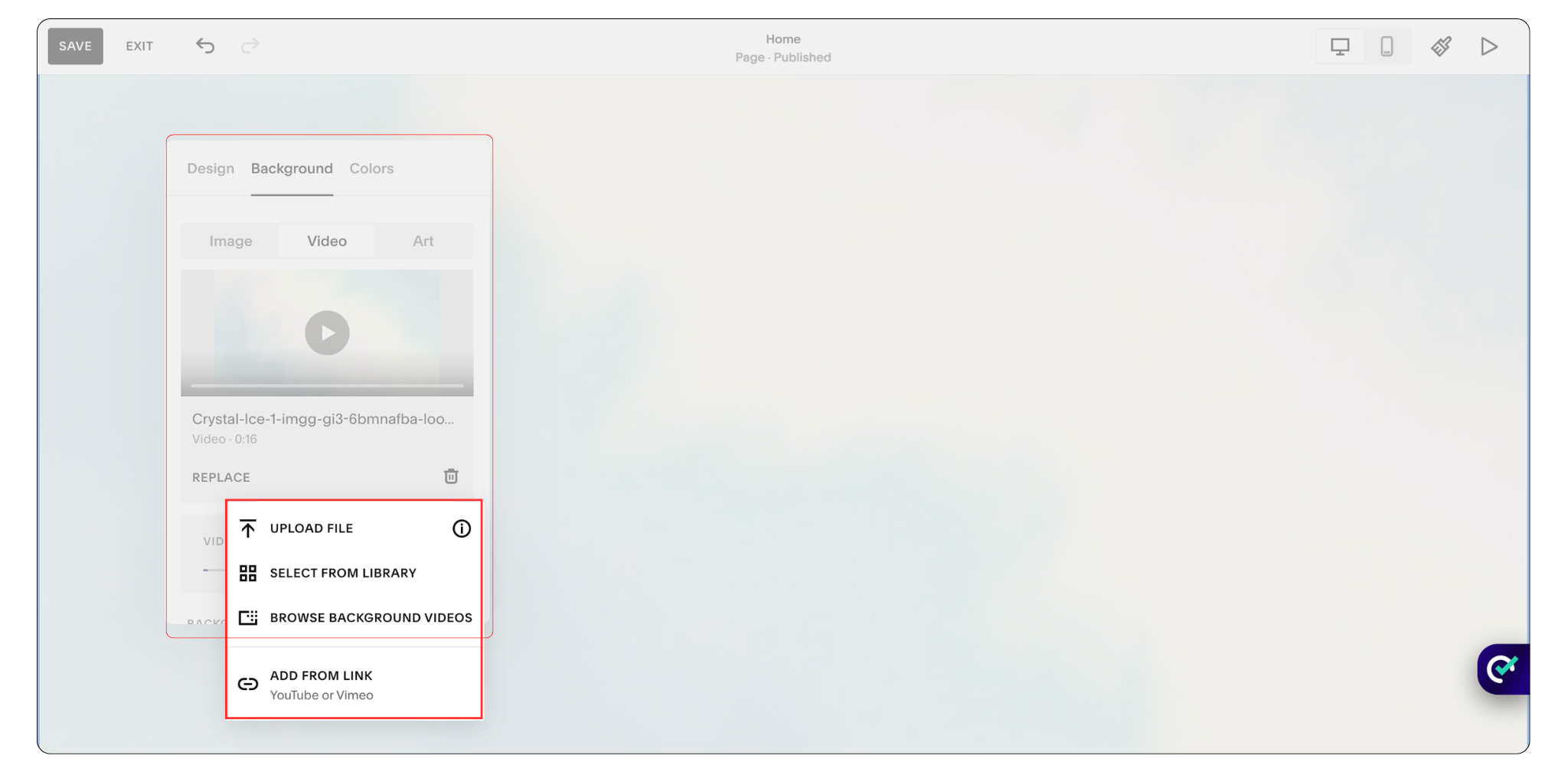
How to Add Background Video Squarespace
Edit the section you want to customize.
Open Background Settings.
Select Video.
Upload a video or paste a YouTube/Vimeo link.
Save your changes.
Keep in mind that background videos are designed for visual impact, not detailed information. A short looping clip usually performs much better than a long video. If your section includes buttons leading to a contact form, background videos can help draw attention without overwhelming visitors.
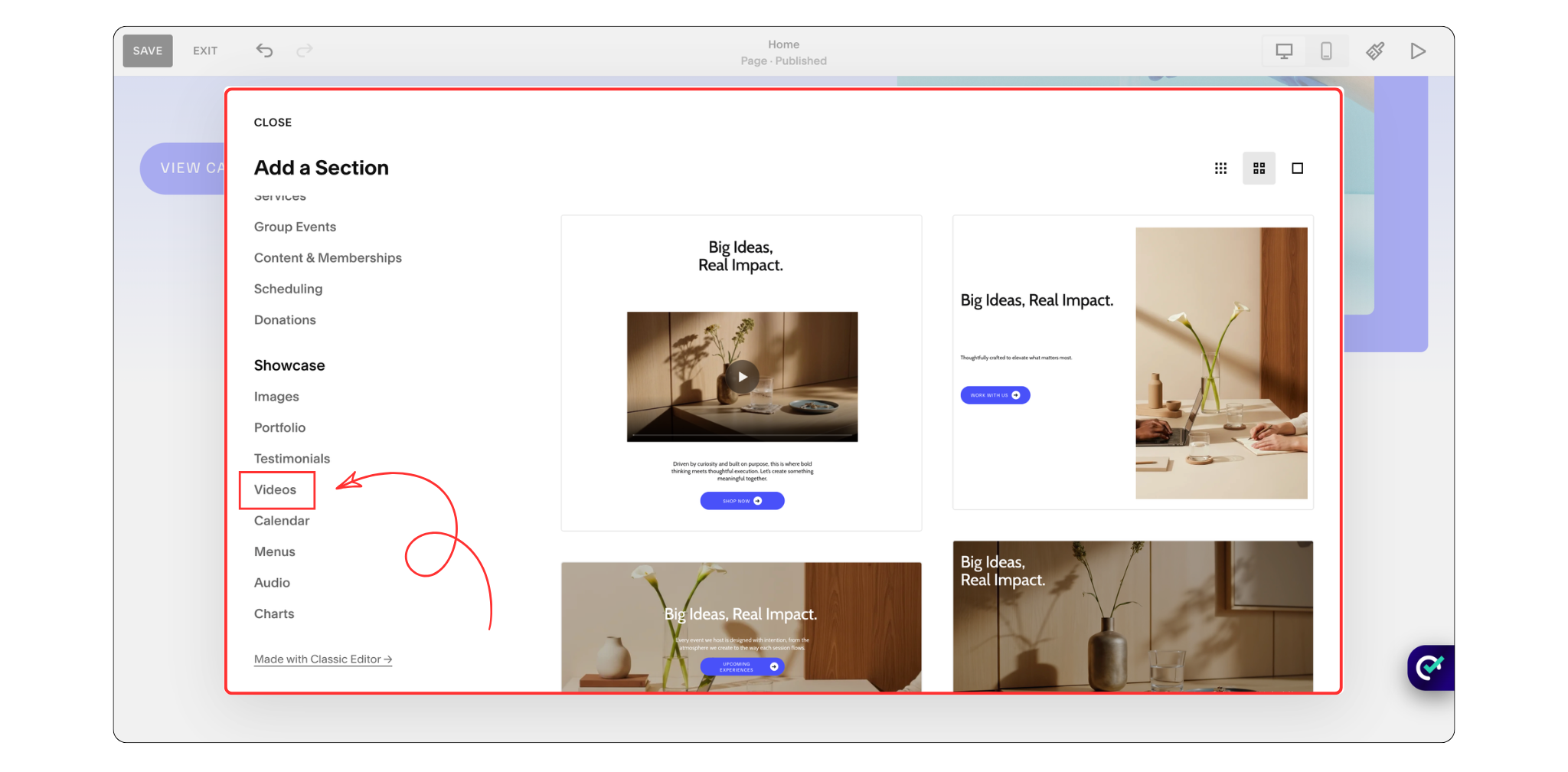
4. Add a Video Section in Squarespace
Squarespace now includes dedicated section layouts designed specifically for video content. Instead of simply dropping a Video Block onto a page, you can create an entire video-focused section.
Steps
Click Add Section.
Browse available section layouts.
Choose a video-based design.
Add your video.
Customize text, spacing, and buttons.
Can You Add Video to a Squarespace Gallery?
Not anymore.
In previous versions, Squarespace offered more flexibility with Gallery Blocks and gallery-style video displays. However, Squarespace has changed how galleries work, and in 2026 you can no longer rely on gallery sections as a primary way to display videos.
Which Method Should You Use?
Here's my recommendation:
Use Embed Code if:
You have long videos
You use YouTube or Vimeo
You care about performance
You need the most flexibility
Use Video Block if:
Your video is under 30 minutes
You want a simple setup
You're a beginner
Use Background Video if:
You want visual movement
You want a modern homepage
For most websites, the Embed method is the best balance between performance, flexibility, and ease of use.
Frequently Asked Questions
How do I add video to Squarespace?
There are several ways to add video to Squarespace, including using an Embed Block, Video Block, Background Video, or a dedicated Video Section. For most websites, I recommend using an Embed Block because it's simple to set up and works well with both YouTube and Vimeo videos
Does adding video slow down my Squarespace website?
It depends on how you add the video. Embedding videos from YouTube or Vimeo generally has less impact on performance than uploading large video files directly to Squarespace. If website speed and SEO are important to you, embedding videos is usually the better option.
What is the video limit in Squarespace?
When using the Video Block to upload videos directly to Squarespace, videos must be under 30 minutes long. If your content is longer than that, using an Embed Block with YouTube or Vimeo is usually the best solution.
Can I add a vertical video in Squarespace?
Yes, you can add vertical videos using Video Blocks, Embed Blocks, and Video Sections. The way the video displays will depend on your page layout and surrounding image content. You may need to adjust spacing and sizing to achieve the best appearance on desktop and mobile devices.
Final Thoughts
Learning how to add video to Squarespace is one of the easiest ways to improve your website and create a better experience for visitors.
Whether you're embedding a YouTube tutorial, adding a Vimeo portfolio video, creating a video-based landing page, or building a membership website, Squarespace offers several ways to display video content.
For most websites, the Embed Block remains my preferred option because it's simple, flexible, and doesn't come with the upload limitations of the Video Block.
Choose the method that best fits your content, and you'll be able to create a more engaging website without adding unnecessary complexity.
You May Also Like



Does your Squarespace website look good on desktop but feel awkward on a phone? Learn how to fix common mobile layout issues, improve navigation, and test the experience before visitors arrive.