
Squarespace SEO Tips to Improve Your Rankings in 2026
If you've built a beautiful Squarespace website but aren't getting much traffic from Google, you're not alone.
Many business owners, consultants and service providers spend hours designing their website but overlook one important thing: SEO.
SEO [Search Engine Optimization], is the process of helping search engines like Google and AI understand your website so they can show it to the right people.
Think about it this way.
When someone searches for:
Squarespace web designer
Interior designer near me
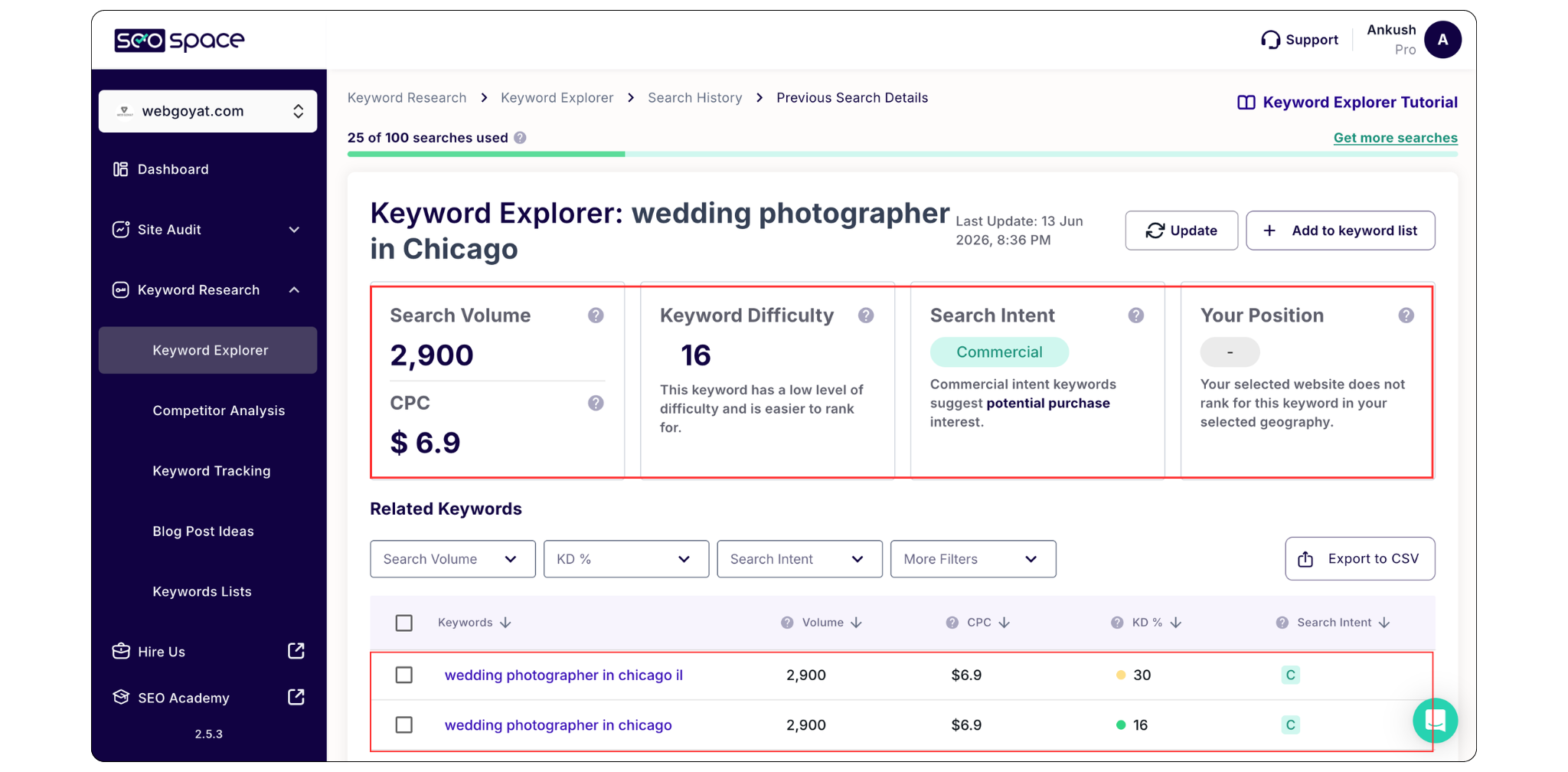
Wedding photographer in Chicago
Business coach for startups
Google has to decide which websites deserve to appear on page one.
SEO helps your website become one of those websites.
The good news is that Squarespace already includes many built-in SEO features. You don't need to be a developer or SEO expert to improve your rankings.
In this Squarespace SEO guide, I'll walk you through the most important SEO tips for beginners and explain exactly how to implement them. We'll Cover:
What Is Squarespace SEO?
Is Squarespace Good for SEO?
Essential Squarespace SEO Tips to Improve Your Rankings
Frequently Asked Questions About Squarespace SEO
What Is Squarespace SEO?
Squarespace SEO refers to the tools, settings and strategies you use to help your Squarespace website rank higher in search engines.
The goal of SEO is simple:
Increase visibility
Attract the right visitors
Generate more leads and sales
When your website appears higher in Google search results, more people are likely to visit it.
For example, if you're a Squarespace web designer and someone searches for "Squarespace website designer," you want Google to understand that your website is relevant to that search.
That's exactly what SEO helps accomplish.
Is Squarespace Good for SEO?
Yes, Squarespace is one of the most SEO-friendly website builders available today.
Every Squarespace website includes:
Mobile-responsive templates
Free SSL security
Automatic XML sitemaps
Custom SEO titles and descriptions
Clean URL structures
Fast hosting
Built-in image optimization tools
These features provide a strong foundation for SEO.
However, simply having these tools doesn't guarantee rankings.
You still need to optimize your content, pages, images, and website structure correctly.
Need Help with Your Squarespace Website?
Book a free kick-off call to discuss your project requirements in detail. Whether you're launching a new Squarespace website, redesigning an existing one, or looking to improve functionality and user experience, we'll help you explore the best options for your goals.
Essential Squarespace SEO Tips to Improve Your Rankings
1. Start With Keyword Research Before You Write Anything
One of the biggest SEO mistakes I see is people creating pages and blog posts without knowing what their audience is actually searching for. Before writing a service page, homepage or blog post, spend a little time researching the keywords your ideal customers use.
Keyword research simply means finding the words and phrases people type into Google when they're looking for information, products, or services like yours.
For example, if you're a photographer, you might assume people search for "creative photography services."
In reality, they may be searching for:
"wedding photographer in Chicago"
"family photographer near me"
"branding photographer for small business"
There's a huge difference.
If you create content around the wrong keyword, you could spend hours writing something that nobody is searching for. That's why keyword research should always come first.
I personally like using SEOSpace, Google Keyword Planner, Ubersuggest and keyword Everywhere because it's beginner-friendly and doesn't overwhelm you with data. Even Google itself can be helpful. Start typing a phrase into Google's search bar and pay attention to the suggestions that appear. Those suggestions come from real searches people are already making.
When choosing keywords, don't just focus on search volume. Think about intent.
Someone searching "what is Squarespace" is looking for information.
Someone searching "hire Squarespace designer" is much closer to becoming a customer.
Understanding that difference can help you create content that attracts the right audience rather than just more traffic.
2. Create Helpful Content That Actually Answers Questions
Google has become incredibly good at recognizing content that genuinely helps people. Years ago, SEO was often about stuffing keywords everywhere and hoping for the best.
Today, that approach doesn't work.
Instead, Google rewards websites that provide useful, clear and trustworthy answers.
Whenever you're writing a page or blog post, ask yourself:
"What question is this content helping someone answer?"
For example, if someone searches for Squarespace SEO tips, they don't want a page filled with technical jargon. They want practical advice they can understand and implement.
The best content is often the content that explains things clearly.
Imagine you're sitting across from a client over coffee. How would you explain the topic to them? That's usually the tone you should use when writing.
Long-form content tends to perform particularly well because it allows you to answer questions thoroughly. However, don't make content longer just for the sake of length. Focus on being helpful.
If a topic can be explained in 800 words, don't force it into 3,000.
Quality always beats quantity.
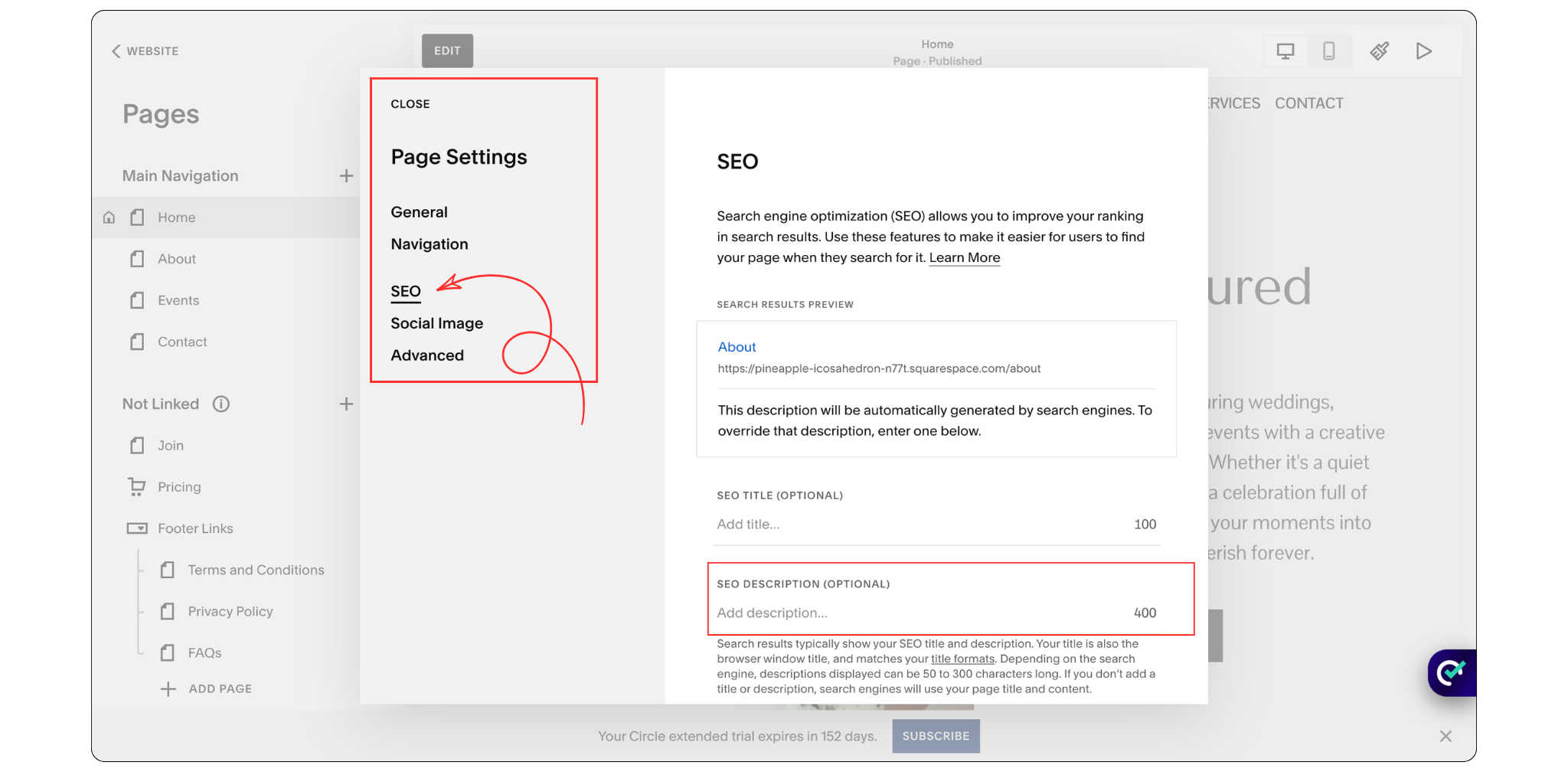
3. Optimize Your SEO Titles
Your SEO title is one of the first things people see when your website appears in Google search results.
It's the blue clickable headline that shows up on the search results page.
Think of it as your first impression.
A good SEO title helps both Google and potential visitors understand exactly what your page is about.
For this article, the title might be:
"Squarespace SEO Tips: A Beginner-Friendly Guide to Improve Rankings in 2026"
Immediately, both Google and the reader know what they'll find on the page.
A weak title, on the other hand, creates confusion.
Titles like "Blog Post #12" or "Website Update" don't tell Google anything useful.
When writing SEO titles, try to naturally include your primary keyword in the title. Keep it clear, specific and focused on the value you're providing.
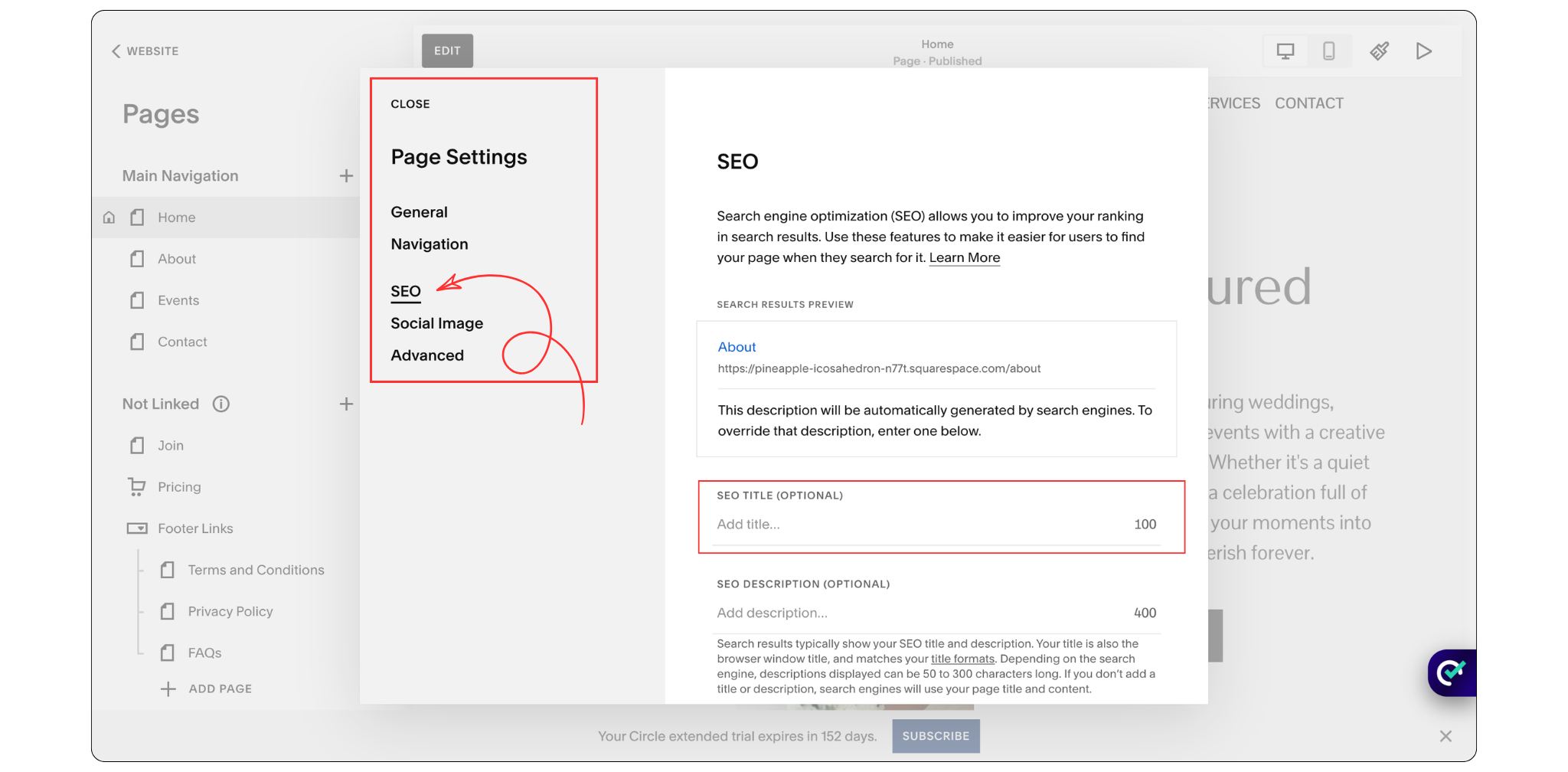
In Squarespace, you can edit your SEO title by opening your page settings and navigating to the SEO tab.
It's a small change, but it can have a significant impact on how people discover your website.
4. Write Meta Descriptions That Encourage Clicks
Right below your SEO title in Google search results, you'll usually see a short paragraph.
That's called a meta description.
A lot of beginners think meta descriptions directly improve rankings.
Technically, they don't.
However, they can improve something equally important: click-through rate.
Imagine two websites appear side by side in Google.
One has a vague description.
The other clearly explains what the visitor will learn and why it's useful.
Which one are you more likely to click?
Exactly.
Your meta description is essentially a mini advertisement for your page.
Instead of treating it as an SEO task, think of it as a sales pitch.
Tell people what they'll learn, what problem you'll solve, or what benefit they'll receive by visiting your page.
For most pages, keeping your meta description around 150-160 characters works well because it prevents Google from cutting off your text.
Squarespace allows you to customize meta descriptions within the SEO settings of each page.
Don't leave them blank.
It's one of the easiest SEO improvements you can make.
5. Use Headings to Make Your Content Easy to Read
Let's be honest, most people don't read every word on a website.
They scan.
When a visitor lands on your page, they're usually looking for a specific answer or piece of information. Clear headings help them quickly find what they're looking for without having to read the entire page. That's why headings play such an important role in both user experience and SEO.
Headings also help search engines understand the structure and hierarchy of your content. Think of them as a roadmap that guides both your visitors and Google through your page.
Your main page title should be your H1 heading. Every page should have only one H1 heading, and ideally, it should include your primary keyword. For example, if your target keyword is Squarespace SEO Tips, your H1 could be:
‘‘Squarespace SEO Tips: A Beginner-Friendly Guide to Improve Rankings in 2026’’
Including your primary keyword in the H1 helps search engines better understand the main topic of the page.
After your H1, use H2 headings for the main sections of your content and H3 headings for supporting topics underneath those sections.
A simple way to think about it is like a book:
The book title is your H1.
The chapters are your H2 headings.
The subchapters are your H3 headings.
This structure makes your content easier to read, easier to navigate, and easier for search engines to understand.
One common mistake I see is people using heading styles simply because they like how they look. For example, they might choose an H2 because the font size looks good, even though it doesn't make sense within the page structure. Headings should be used to organize content logically, not just for visual styling. If you want a different appearance, you can always adjust the design separately.
A well-structured page not only creates a better experience for your visitors but also helps Google understand your content more effectively, which can support your overall SEO efforts.
6. Create Clean and SEO-Friendly URL Slugs
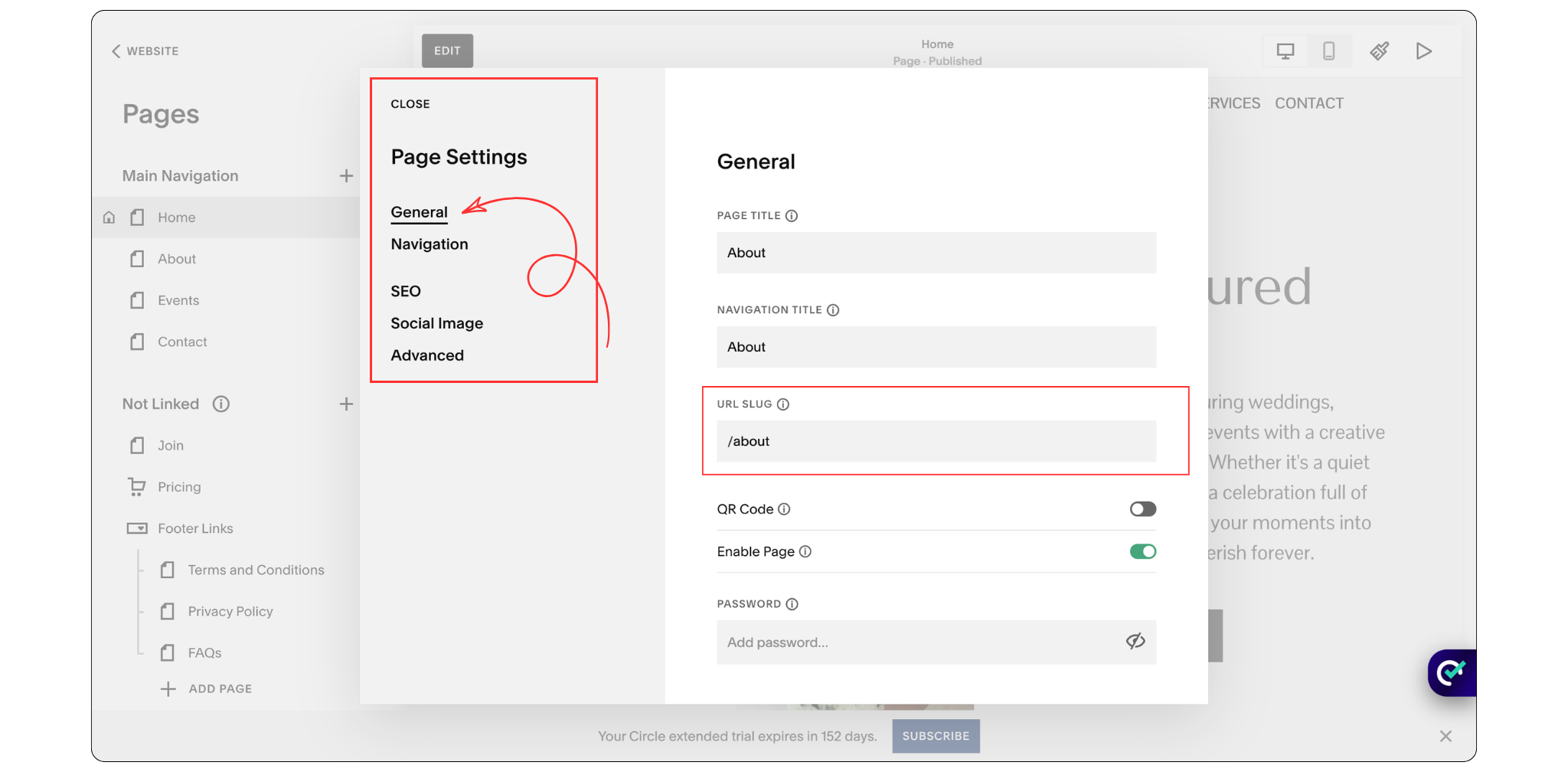
A URL slug is the part of a URL that comes after your domain name. While it may seem like a small detail, it helps both visitors and search engines understand what a page is about.
When creating URL slugs, keep them short, descriptive and relevant to the page content. A clean URL is easier to read, easier to share, and gives search engines more context about your page.
Whenever possible, include your primary keyword in the URL slug and avoid unnecessary words, numbers, dates or special characters. For example, a URL like /squarespace-seo-tips is much clearer than /blog-post-final-version-2026.
In Squarespace, you can edit the URL slug directly from the page settings before publishing your page.
7. Add Internal Links to Related Pages
Internal links are links that connect one page of your website to another page on the same website. They help search engines understand your website structure and make it easier for visitors to discover related content.
For example, if you're writing a blog post about image optimization, you could link to another article about image sizes or website speed. This helps visitors find more useful information while encouraging them to spend more time on your website.
When adding internal links, use descriptive anchor text instead of generic phrases like "click here." For example, "learn more about image optimization" provides much more context than simply saying "click here."
Adding relevant internal links throughout your website is a simple SEO practice that improves navigation, user experience, and search engine understanding of your content.
8. Optimize Images for Faster Loading Speeds
Images can make a website look professional and engaging, but they can also slow it down if they're not optimized properly. Page speed is an important ranking factor because Google wants to provide users with fast and reliable websites.
If your pages take too long to load, visitors may leave before they even see your content.
Before uploading images to Squarespace, take a few moments to compress them.
Tools like TinyPNG and Image Compressor make this incredibly easy. Simply upload your image, let the tool reduce the file size, and then upload the optimized version to your website.
As a general guideline:
Banner images should ideally stay below 500 KB
Most other website images should stay below 250 KB
Smaller image sizes help pages load faster while still maintaining good visual quality.
It's also worth choosing the correct image dimensions before uploading. There's no reason to upload a 5000-pixel-wide image if it will only display at 1200 pixels.
Optimized images create a better experience for visitors and support your SEO efforts at the same time.
9. Add Descriptive Alt Text to Your Images
Alt text is a short description that helps search engines and screen readers understand what an image is about.
When adding alt text, simply describe the image in a clear and natural way. Avoid stuffing keywords or writing descriptions that sound unnatural.
For example, if an image shows keyword research, a good alt text could be: "Keyword research process for improving website SEO."
Squarespace also offers AI-generated alt text suggestions, which can help save time when optimizing multiple images.
10. Connect Your Website to Google Search Console
Google Search Console is a free tool that helps you understand how your website performs in Google Search.
It shows which keywords people use to find your website, which pages receive traffic, and whether Google is having trouble indexing your content.
If you're working on SEO, connecting Google Search Console should be one of the first things you do because it provides real data instead of guesswork.
11. Implement Schema Markup
Schema markup is a type of code that helps search engines better understand your content.
For example, schema can tell Google whether a page is a blog post, service page, FAQ page, or local business page.
While visitors won't see schema markup, it can help search engines understand your website more clearly and may improve how your pages appear in search results.
12. Fix Broken Links and Create 301 Redirects
Broken links occur when a page has been moved, deleted, or renamed.
They create a poor user experience and can make it harder for search engines to crawl your website.
If you change a page URL, always create a 301 redirect. This automatically sends visitors and search engines from the old URL to the new one, helping preserve your SEO value.
Frequently Asked Questions About Squarespace SEO
How to maximize SEO on Squarespace?
Focus on the fundamentals: keyword research, high-quality content, SEO titles, meta descriptions, internal linking, image optimization, and Google Search Console. Consistently improving these areas will have a greater impact than chasing SEO shortcuts.
Is SEO dead or evolving in 2026?
SEO is definitely not dead. However, it continues to evolve as search engines become smarter. In 2026, success depends more on creating helpful content, demonstrating expertise, and providing a strong user experience than simply targeting keywords.
Is Squarespace good for SEO?
Yes. Squarespace includes many built-in SEO features such as mobile-responsive templates, SSL security, automatic sitemaps, customizable SEO settings, and clean code structures that support search engine optimization.
Will AI replace SEO?
AI is changing how people search and discover information, but it isn't replacing SEO. Instead, SEO is adapting. Businesses that create valuable content and build authority will continue to benefit from search traffic, whether that traffic comes from traditional search engines or AI-powered search experiences.
What are the four types of SEO?
The four main types of SEO are:
On-Page SEO
Off-Page SEO
Technical SEO
Local SEO
Each plays an important role in improving a website's visibility and search performance.
Can I hire Web Goyat for my website SEO?
Web Goyat primarily provides SEO as part of its website design services. If you're already working with Web Goyat on a website project, SEO can be included as an additional service. However, if you're looking for dedicated SEO-only services, it may be worth working with a specialist who focuses exclusively on SEO.
Final Thoughts
SEO can feel overwhelming when you're first getting started, but it doesn't have to be.
You don't need expensive software, advanced technical knowledge, or a massive marketing team to improve your rankings.
In most cases, success comes from consistently applying the fundamentals.
Focus on creating helpful content, targeting the right keywords, structuring your pages properly, optimizing images, and making it easy for both visitors and search engines to understand your website.
The good news is that Squarespace already provides many of the tools you need. By implementing the strategies covered in this guide, you'll build a stronger SEO foundation and give your website a better chance of attracting qualified organic traffic over time.
Remember, SEO isn't a one-time task. It's an ongoing process. The websites that perform best are usually the ones that continue improving, updating, and refining their content over time.
